Moonpreneur Icon

Magic Sensor Lamp

MoonCampaign by Ajinkya (9 years)

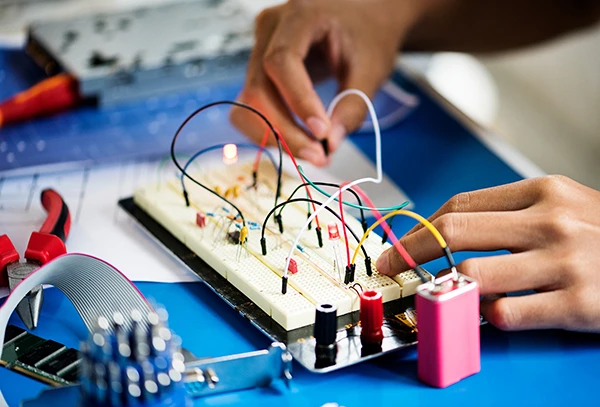
My name is Ajinkya, and my project is called the Magic Sensor. I built it using a micro:bit’s light sensor and an RGB LED lamp. The sensor reads the surrounding light level and changes the LED color based on how bright it is. For example, red glows at low light, green at medium, blue at higher light, and special colors like yellow, purple, or cyan at even brighter levels. If the light is very bright, all colors turn on. I used variables for pin assignments, if-elif-else statements for logic, and a while loop to keep the program running.

  • 👍
  • 🎁 48 days left

Your support will go a long way in encouraging Ajinkya and taking their innovation Magic Sensor Lamp to new heights.

Magic Sensor Lamp

terms and conditions

Our Social Impact - We're transforming education globally with free robotics and math workshops in the US, UK, Canada, and Australia. Our workshops have helped 66,000 students alone in the US plus 14,000 students benefit from our four-week sessions.

Impact of MoonCampaigns

5000+

Innovative MoonCampaigns

20,000+

Minutes of Visual Content

1M+

Unique Video Views

40,000+

Unique Feedbacks

80%

STEM Transformation

95%

Increased Confidence

Learning Journey

  • Moonpreneur STEM Program Student

    Project Name: Magic Sensor Lamp

  • Skills

    Arduino programming, sensor integration, conditional logic, product design, and more

  • Category

    Show n Tell

Impact of MoonCampaigns

MoonCampaigns highlight student's creativity, public speaking, presentation skills, and teamwork, with an impressive track record that speaks volumes. MoonCampaigns, through quarterly Show & Tell, highlight thousands of inspiring learning stories from Moonpreneur students worldwide.

5000+

Innovative MoonCampaigns

20,000+

Minutes of Visual Content

1M+

Unique Video Views

40,000+

Unique Feedbacks and appreciation to kids from community

80%

parents observed transformational changes in their ward's STEM knowledge and leadership skills

95%

Parents Reported Increased Confidence in their child

Want your child to be part of an innovative and creative competition?

STORY

Total Views:

Hi, my name is Ajinkya, and I’m excited to share my project, the Magic Sensor, for this show and tell. I’ve always been fascinated by how sensors can react to the world around us, so I decided to use the micro:bit’s built-in light sensor to create something colorful and interactive.


The Magic Sensor works by constantly checking the light level in the room. I set up three variables for the red, green, and blue pins of my RGB LED lamp, and another variable to store the current light reading. In my code, I used a while loop so the program would keep running and updating the LED color in real time.


Depending on the light level, the Magic Sensor changes the color of the LED. If the room is dim and the light level is below 50, nothing happens. If the light level is above 50, the LED glows red. As it gets brighter, the colors change: green for over 75, blue for over 120, yellow for over 140, purple for over 150, and cyan for over 200. If the light level is almost at the maximum, all the colors turn on, making a dazzling display!


I used if, elif, and else statements to decide which color to show, and digital write commands to control the LEDs. I also learned about using variables to store pin numbers and sensor values, and how to use sleep to give the program a short break between updates.


Building the Magic Sensor taught me a lot about coding, sensors, and how to make electronics react to the environment. I’m proud of how it turned out, and I’m excited to keep experimenting with more sensor-based projects in the future!


Every child is gifted. Discover how yours can innovate and lead

Feedback

See what people around the world are saying about Krishanth's innovative
bike safety project

The Future Belongs to Critical Thinkers

Hard Truth About Future of Work

WEF's Future of Jobs Report 2025 reveals that 40% of employers expect to reduce their workforce where AI can automate tasks . While AI is projected to create 69 million new jobs globally by 2030, it will simultaneously eliminate 83 million positions, particularly in clerical, administrative, and routine cognitive roles. The message is clear: routine tasks are being automated, but critical thinking and communication skills cannot be replaced.


What AI Can Never Replace:
  • Critical Thinking & Analysis

    Rated by 78% of business executives as the most important skill they seek, yet only 34% of college graduates arrive well-prepared in this area

  • Communication Skills

    Essential for collaboration, innovation, and leadership in STEM fields

  • Problem-Solving

    The ability to break down complex, unprecedented challenges and devise creative solutions

  • Adaptability & Resilience

    Mental agility to assess new situations and pivot strategies in rapidly changing environments

MoonCampaign Prepares the Next Generation

When students (ages 7-16) build projects, they're not just learning to code, they're developing the future-proof skills that AI cannot replicate:

  • Technical Skills:

    Arduino programming, sensor integration, conditional logic, and hardware troubleshooting

  • Critical Thinking:

    Analyzing real-world safety problems, designing solutions, and debugging when things don't work as expected

  • Communication:

    Articulating their process, presenting their work, and explaining complex technical concepts in accessible language

  • Digital Marketing & Entrepreneurship:

    Showcasing their innovations publicly, building their personal brand, and learning to pitch their ideas

  • Problem-Solving:

    Overcoming challenges like mixed-up variables and incorrect responses through systematic troubleshooting

You Might Also Like

Every child is gifted. Discover how yours can innovate and lead